Centos7安装dig命令
最近做一个项目,需要用到Gmail邮箱发送邮件,但发现发送不出去。
排查问题时,需要用到dig命令,但使用时,却提醒我dig命令不存在~
那就安装吧,习惯性的运行yum install dig,却提示我没这个包?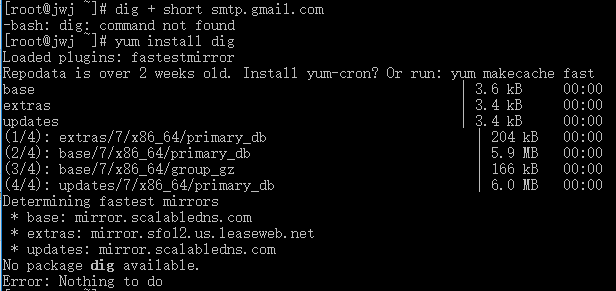
经过查找资料,原来dig命令属于bind-utils工具包,安装这个包之后就可以使用dig命令了。
yum install bind-utils最近做一个项目,需要用到Gmail邮箱发送邮件,但发现发送不出去。
排查问题时,需要用到dig命令,但使用时,却提醒我dig命令不存在~
那就安装吧,习惯性的运行yum install dig,却提示我没这个包?
经过查找资料,原来dig命令属于bind-utils工具包,安装这个包之后就可以使用dig命令了。
yum install bind-utils作为一个习惯追新的人,最近把nginx升级到了1.15.2,修改站点配置并重新加载配置文件时,发现报警告。
虽然不影响正常,也不是处女座,但还是看不顺眼,经过一番百度 Google,终于找到原因和解决方法!
nginx: [warn] the "ssl" directive is deprecated, use the "listen ... ssl" directive instead in /usr/local/nginx/conf/vhost/test.ll00.cn:24新版本不推荐使用ssl指令,所以会发出一段警告。使用listen 443 ssl;代替
在配置文件里,找到ssl on;,将其注释掉
# ssl on;然后修改监听端口处的配置后面加上ssl
listen 443 ssl;Changes with nginx 1.15.0 05 Jun 2018
*) Change: the "ssl" directive is deprecated; the "ssl" parameter of the
"listen" directive should be used instead.
*) Change: now nginx detects missing SSL certificates during
configuration testing when using the "ssl" parameter of the "listen"
directive.
*) Feature: now the stream module can handle multiple incoming UDP
datagrams from a client within a single session.
*) Bugfix: it was possible to specify an incorrect response code in the
"proxy_cache_valid" directive.
*) Bugfix: nginx could not be built by gcc 8.1.
*) Bugfix: logging to syslog stopped on local IP address changes.
*) Bugfix: nginx could not be built by clang with CUDA SDK installed;
the bug had appeared in 1.13.8.
*) Bugfix: "getsockopt(TCP_FASTOPEN) ... failed" messages might appear
in logs during binary upgrade when using unix domain listen sockets
on FreeBSD.
*) Bugfix: nginx could not be built on Fedora 28 Linux.
*) Bugfix: request processing rate might exceed configured rate when
using the "limit_req" directive.
*) Bugfix: in handling of client addresses when using unix domain listen
sockets to work with datagrams on Linux.
*) Bugfix: in memory allocation error handling.Install 'net-tools' and 'wget' packages on CentOS 7:
yum install net-tools wgethttps://openvpn.net/index.php/access-server/download-openvpn-as-sw.html
Type wget followed by the pasted URL:
wget <paste copied url>Install downloaded package on RedHat/CentOS/Fedora system:
rpm -Uvh openvpn-as-2.1.12-CentOS7.x86_64.rpmThe installation process should then commence and finish. The output may look like this:
The Access Server has been successfully installed in /usr/local/openvpn_as Configuration log file has been written to /usr/local/openvpn_as/init.log Please enter "passwd openvpn" to set the initial administrative password, then login as "openvpn" to continue configuration here: https://192.168.70.222:943/admin To reconfigure manually, use the /usr/local/openvpn_as/bin/ovpn-init tool. Access Server web UIs are available here: Admin UI: https://192.168.47.222:943/admin Client UI: https://192.168.47.222:943/
The Access Server tries to adapt itself to the network configuration it finds. But if you have a complex network setup you may need to run the ovpn-init tool to reconfigure to listen to another network interface. It's worth mentioning that the ovpn-init tool can be used to wipe all OpenVPN Access Server configuration with the --force option in case you make a mistake during initial setup. Don't use the --force option on an existing installation unless you can live with losing all configuration and certificates and want to start over. Also, the program will ask for a license key, but you do not have to enter one. If no valid license key is found it will just assume a demonstration mode where all functions work but you're limited to 2 simultaneous VPN tunnel connections.
Finishing configuration and using the product
Once the program is installed it will automatically configure itself with some standard settings. The installation process will also tell you where to find the client web service, which is the web based GUI that you can use to log on and connect to the Access Server, and where to find the admin web service, which is where you can log on as an administrative user and manage the configuration, certificate, users, etcetera, in the web based GUI. Usually the client UI is at the address of your server, for example https://192.168.70.222/. The admin UI is usually at the /admin/ address, for example https://192.168.70.222/admin/. Please note that the web services by default actually run on port TCP 943, so you can visit them at https://192.168.70.222:943/ and https://192.168.70.222:943/ as well. The OpenVPN TCP daemon that runs on TCP port 443 redirects incoming browser requests so that it is slightly easier for users to open the web interface.
Initially a single administrative user is added to the system. But it has no password set and therefore cannot be used yet. To use it a password must be set first:
passwd openvpnYou can now point your web browser at the admin UI web interface. Because the Access Server comes with a self-signed SSL certificate to begin with, you will receive a warning in the browser like "Invalid certificate" or "Cannot verify identity of the server". You will have to confirm that you wish to continue to the web interface. You will then see the login screen and you can then enter the username openvpn and the password you have just set with the "passwd openvpn" command.
写程序的时候,难免需要用到自动任务,例如:超时订单自动取消。
刚开始我用crontab来实现,但发现会出问题:
最后找到了一个解决问题,就是使用Supervisor来运行任务,完美解决了以上问题,并且方便了任务管理。
以下内容都是参考官方教程来编写,并且在完善当中。
这里提供两种安装方法,分别是使用 easy_install 安装和使用 yum 安装
easy_install 安装1.安装supervisor
easy_install supervisor2.生成配置文件
echo_supervisord_conf > /etc/supervisord.conf3.生成supervisord.service服务文件
curl https://raw.githubusercontent.com/Supervisor/initscripts/master/centos-systemd-etcs > /lib/systemd/system/supervisord.service4.修改supervisord.service文件权限
chmod +x /lib/systemd/system/supervisord.serviceyum 安装yum install supervisorCentos8系统可以使用dnf包管理器来安装
dnf install supervisor启用服务后,会跟随系统开机自启
systemctl enable supervisord返回结果
Created symlink from /etc/systemd/system/multi-user.target.wants/supervisord.service to /usr/lib/systemd/system/supervisord.service.禁用服务后,不会跟随系统开机自启
systemctl disable supervisord也就是启动 supervisor
systemctl start supervisord也就是查看 supervisor 运行状态
systemctl status supervisordsystemctl stop supervisordsystemctl start supervisord/etc/supervisord.conf:
; supervisor 示例配置文件
;
; 有关配置文件的更多信息,请参阅:
; http://supervisord.org/configuration.html
;
; 提示:
;  - Shell expansion ("~" or "$HOME") is not supported.  Environment
;    variables can be expanded using this syntax: "%(ENV_HOME)s".
;  - Quotes around values are not supported, except in the case of
;    the environment= options as shown below.
;  - Comments must have a leading space: "a=b ;comment" not "a=b;comment".
;  - Command will be truncated if it looks like a config file comment, e.g.
;    "command=bash -c 'foo ; bar'" will truncate to "command=bash -c 'foo ".

[unix_http_server]
file=/tmp/supervisor.sock   ; 套接字(socket)文件的路径
;chmod=0700                 ; 套接字(socket)文件的权限 (default 0700)
;chown=nobody:nogroup       ; 套接字(socket)文件的所有组和所有者
;username=user              ; 用户名,在终端管理Supervisor时使用(默认没有用户名)
;password=123               ; 密码,在终端管理Supervisor时使用(默认没有密码)

;[inet_http_server]         ; inet (TCP) 服务,用于通过web管理任务
;port=127.0.0.1:9001        ; 监听地址(IP地址:端口), *:port 表示监听所有IP
;username=user              ; 用户名,在web管理Supervisor时使用(默认没有用户名)
;password=123               ; 密码,在web管理Supervisor时使用(默认没有密码)

[supervisord]
logfile=/tmp/supervisord.log ; 主日志文件; 默认 $CWD/supervisord.log
logfile_maxbytes=50MB        ; max main logfile bytes b4 rotation; default 50MB
logfile_backups=10           ; # of main logfile backups; 0 means none, default 10
loglevel=info                ; 日志等级,默认为:info. 其它选项: debug,warn,trace
pidfile=/tmp/supervisord.pid ; supervisord pidfile; default supervisord.pid
nodaemon=false               ; start in foreground if true; default false
minfds=1024                  ; min. avail startup file descriptors; default 1024
minprocs=200                 ; min. avail process descriptors;default 200
;umask=022                   ; process file creation umask; default 022
;user=chrism                 ; default is current user, required if root
;identifier=supervisor       ; supervisord identifier, default is 'supervisor'
;directory=/tmp              ; default is not to cd during start
;nocleanup=true              ; don't clean up tempfiles at start; default false
;childlogdir=/tmp            ; 'AUTO' child log dir, default $TEMP
;environment=KEY="value"     ; key value pairs to add to environment
;strip_ansi=false            ; strip ansi escape codes in logs; def. false

; The rpcinterface:supervisor section must remain in the config file for
; RPC (supervisorctl/web interface) to work.  Additional interfaces may be
; added by defining them in separate [rpcinterface:x] sections.

[rpcinterface:supervisor]
supervisor.rpcinterface_factory = supervisor.rpcinterface:make_main_rpcinterface

; The supervisorctl section configures how supervisorctl will connect to
; supervisord.  configure it match the settings in either the unix_http_server
; or inet_http_server section.

[supervisorctl]
serverurl=unix:///tmp/supervisor.sock ; use a unix:// URL  for a unix socket
;serverurl=http://127.0.0.1:9001 ; use an http:// url to specify an inet socket
;username=chris              ; should be same as in [*_http_server] if set
;password=123                ; should be same as in [*_http_server] if set
;prompt=mysupervisor         ; cmd line prompt (default "supervisor")
;history_file=~/.sc_history  ; use readline history if available

; The sample program section below shows all possible program subsection values.
; Create one or more 'real' program: sections to be able to control them under
; supervisor.

;[program:theprogramname]
;command=/bin/cat              ; 需要执行的命令(相对使用PATH,可以使用参数)
;process_name=%(program_name)s ; 进程名称表达式(默认:%(program_name)s)
;numprocs=1                    ; 要启动的进程数(默认:1)
;directory=/tmp                ; 工作目录,执行命令前,转到该目录(默认:无)
;umask=022                     ; 进程权限掩码 (默认:无)
;priority=999                  ; 优先级,正序 (默认:999)
;autostart=true                ; 跟随supervisord自动启动 (默认:是)
;startsecs=1                   ; 启动后运行x秒才算正常 (默认: 1)
;startretries=3                ; 启动失败最大重试次数 (默认: 3)
;autorestart=unexpected        ; 什么情况下自动重启(true=是,false=否,unexpected=异常退出时才重启) (默认: unexpected)
;exitcodes=0,2                 ; 'expected' exit codes used with autorestart (default 0,2)
;stopsignal=QUIT               ; 终止进程信号 (默认: TERM)
;stopwaitsecs=10               ; b4 SIGKILL 最大等待时间(秒) (默认: 10)
;stopasgroup=false             ; 向 UNIX 进程组发送停止信号 (默认: false)
;killasgroup=false             ; SIGKILL the UNIX process group (def false)
;user=chrism                   ; 设置命令运行用户
;redirect_stderr=true          ; 将 proc stderr 重定向至 stdout (默认: false)
;stdout_logfile=/a/path        ; 终端日志保存文件(执行命令一般都会有内容信息返回),默认值:AUTO,其它选项:NONE
;stdout_logfile_maxbytes=1MB   ; max # logfile bytes b4 rotation (default 50MB)
;stdout_logfile_backups=10     ; # of stdout logfile backups (0 means none, default 10)
;stdout_capture_maxbytes=1MB   ; number of bytes in 'capturemode' (default 0)
;stdout_events_enabled=false   ; emit events on stdout writes (default false)
;stderr_logfile=/a/path        ; stderr log path, NONE for none; default AUTO
;stderr_logfile_maxbytes=1MB   ; max # logfile bytes b4 rotation (default 50MB)
;stderr_logfile_backups=10     ; # of stderr logfile backups (0 means none, default 10)
;stderr_capture_maxbytes=1MB   ; number of bytes in 'capturemode' (default 0)
;stderr_events_enabled=false   ; emit events on stderr writes (default false)
;environment=A="1",B="2"       ; process environment additions (def no adds)
;serverurl=AUTO                ; override serverurl computation (childutils)

; The sample eventlistener section below shows all possible eventlistener
; subsection values.  Create one or more 'real' eventlistener: sections to be
; able to handle event notifications sent by supervisord.

;[eventlistener:theeventlistenername]
;command=/bin/eventlistener    ; the program (relative uses PATH, can take args)
;process_name=%(program_name)s ; process_name expr (default %(program_name)s)
;numprocs=1                    ; number of processes copies to start (def 1)
;events=EVENT                  ; event notif. types to subscribe to (req'd)
;buffer_size=10                ; event buffer queue size (default 10)
;directory=/tmp                ; directory to cwd to before exec (def no cwd)
;umask=022                     ; umask for process (default None)
;priority=-1                   ; the relative start priority (default -1)
;autostart=true                ; start at supervisord start (default: true)
;startsecs=1                   ; # of secs prog must stay up to be running (def. 1)
;startretries=3                ; max # of serial start failures when starting (default 3)
;autorestart=unexpected        ; autorestart if exited after running (def: unexpected)
;exitcodes=0,2                 ; 'expected' exit codes used with autorestart (default 0,2)
;stopsignal=QUIT               ; signal used to kill process (default TERM)
;stopwaitsecs=10               ; max num secs to wait b4 SIGKILL (default 10)
;stopasgroup=false             ; send stop signal to the UNIX process group (default false)
;killasgroup=false             ; SIGKILL the UNIX process group (def false)
;user=chrism                   ; setuid to this UNIX account to run the program
;redirect_stderr=false         ; redirect_stderr=true is not allowed for eventlisteners
;stdout_logfile=/a/path        ; stdout log path, NONE for none; default AUTO
;stdout_logfile_maxbytes=1MB   ; max # logfile bytes b4 rotation (default 50MB)
;stdout_logfile_backups=10     ; # of stdout logfile backups (0 means none, default 10)
;stdout_events_enabled=false   ; emit events on stdout writes (default false)
;stderr_logfile=/a/path        ; stderr log path, NONE for none; default AUTO
;stderr_logfile_maxbytes=1MB   ; max # logfile bytes b4 rotation (default 50MB)
;stderr_logfile_backups=10     ; # of stderr logfile backups (0 means none, default 10)
;stderr_events_enabled=false   ; emit events on stderr writes (default false)
;environment=A="1",B="2"       ; process environment additions
;serverurl=AUTO                ; override serverurl computation (childutils)

; The sample group section below shows all possible group values.  Create one
; or more 'real' group: sections to create "heterogeneous" process groups.

;[group:thegroupname]
;programs=progname1,progname2  ; each refers to 'x' in [program:x] definitions
;priority=999                  ; 相对启动优先级 (默认: 999)

; The [include] section can just contain the "files" setting.  This
; setting can list multiple files (separated by whitespace or
; newlines).  It can also contain wildcards.  The filenames are
; interpreted as relative to this file.  Included files *cannot*
; include files themselves.

;[include]
;files = relative/directory/*.ini
重启单个任务
supervisorctl restart 任务名重启多个任务
supervisorctl restart 任务名1 任务名2 任务名3 任务名...重启群组内的所有任务
supervisorctl restart 群组名:*重启所有任务
supervisorctl restart all启动单个任务
supervisorctl start 任务名启动多个任务
supervisorctl start 任务名1 任务名2 任务名3 任务名...启动群组内的所有任务
supervisorctl start 群组名:*启动所有任务
supervisorctl start all查看单个任务
supervisorctl status 任务名查看多个任务
supervisorctl status 任务名1 任务名2 任务名3 任务名...查看群组内的所有任务
supervisorctl status 群组名:*查看所有任务
supervisorctl status all停止单个任务
supervisorctl stop 任务名停止多个任务
supervisorctl stop 任务名1 任务名2 任务名3 任务名...停止群组内的所有任务
supervisorctl stop 群组名:*停止所有任务
supervisorctl stop all重新加载配置文件并重启所有任务
supervisorctl reload重新加载配置文件并重启配置有变动的任务(适合只更新单个任务的配置,但又不想重启所有任务的情况)
supervisorctl reread
supervisorctl update查看任务的实时执行情况(相当于直接在终端中执行,可以查看到实时的终端信息输出)
supervisorctl tail -f 任务名查看最后100字节日志
supervisorctl tail -100 任务名查看最后1600字节错误日志
supervisorctl tail 任务名 stderr以前台模式连接到进程
supervisorctl fg 任务名